Understanding of MVVM architecture
After done one WPF application and one JavaFX application, I already have a good understanding of MVVM architecture. Although MVVM architecture was first introduced by Microsoft and widely used in WPF application, now some other applications also can use it, for example, Android application by using google data-binding library and Web application by using Angular JS. MVVM becoming more and more popular is because its loose coupling and clear responsibility of View layer and Control layer, comparing with traditional MVC.
Why MVVM architecture is loosely decoupled?
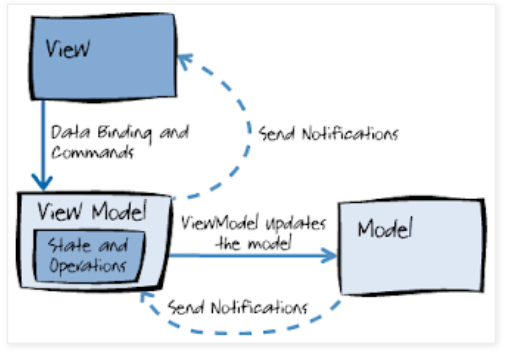
The reason is simple. In MVVM, only View layer is holding the reference of View Model, only View Model is holding the reference of Model layer. Not like MVC, even Model layer also can hold the reference of View layer. As a results, when one view is not used, its memory can be collected even its modeling is used by another view.
Data binding
The foundation of MVVM is data binding, without data binding, MVVM cannot be achieved. MVVM use data binding to communicate with View and View Model. This is the basic principle of MVVM. Someone may make mistake to use data binding with View and Model, it’s not a correct practice. In MVVM, View only communicates with View Model directly.
Implementation
As long as you know how to work in each layer, you know how to implement MVVM.
View
- Create UI components
- Create data-binding with View Model
- Limited components event handler Ideally an MVVM application should not have any code like this where a button’s click event is handled in the code-behind of the view: ```
protected void btn_Click(object sender, RoutedEventArgs e) { /* This is not MVVM! */ } ``` Instead, in addition to providing properties to expose data to be displayed or edited in the view, the view model defines actions that can be performed by the user and typically expose these as commands. The reason that don’t put these event handlers in View layer is because normally inside even handler, you will be inevitable to do some UI logic. But for MVVM, all the UI logic should go to View Model.
View Model
- Create data binding properties
- Commands
- Value Converters All the UI logic should be implemented in View Model. For example, when the data is fetching, a progress bar is shown, after the data is loaded, the progress bar is dismissed, and the UI is updated. The interaction of UI logic is done in View Model, because View Model is holding all the properties that binding to the View. All the view change can be done in View Model through data binding. So it’s the best place to do UI components interaction. View Model is only doing UI logic, not business logic, don’t put the business logic here also.
Model
- Creating plain objects
- Implement business logic The Modeling layer is just some plain objects with some business logic. In multi-platform application, the business logic is implemented at server side and is commonly used by different clients, for example, web, mobile application. To reduce the development effort, you can put as much of logic in server side as possible.
View -> View Model
View and View Model are mapping together. When you have a Label on view, you might need a string property in View Model. When you have a Table on view, you might need a list property in View Model. When the view is changed by using, the property in View Model is changed automatically, if you already implement the data binding.
View Model -> View
If you set the data binding to bi-direction, View can be updated when View Model property is changed. Data binding has the mechanism to send notifications when the View Model property is changed. In WPF, you need to implement INotifyPropertyChanged to enable this function. Or in another way, use observable property (normally an ObservableCollection), and implement the event listener in View layer (This is the only way in JavaFX application).
View Model -> Model
Because View Model is holding the reference of Modeling, View Model can change the Model data directly.
Model->View Model
In simple application, you may don’t need even consider this problem. Because all the UI logic is done in View Model, and View Model record the change in Model layer, you don’t need the Model to change View Model. In some complicated application, especially multiple views sharing the same modeling, we still need it. In this case, we can use some messaging framework (PRISM, OSGi EventAdmin).
View Model <-> View Model
Same as Model to View Model, you can use some messaging framework to communicate between View Models.

